
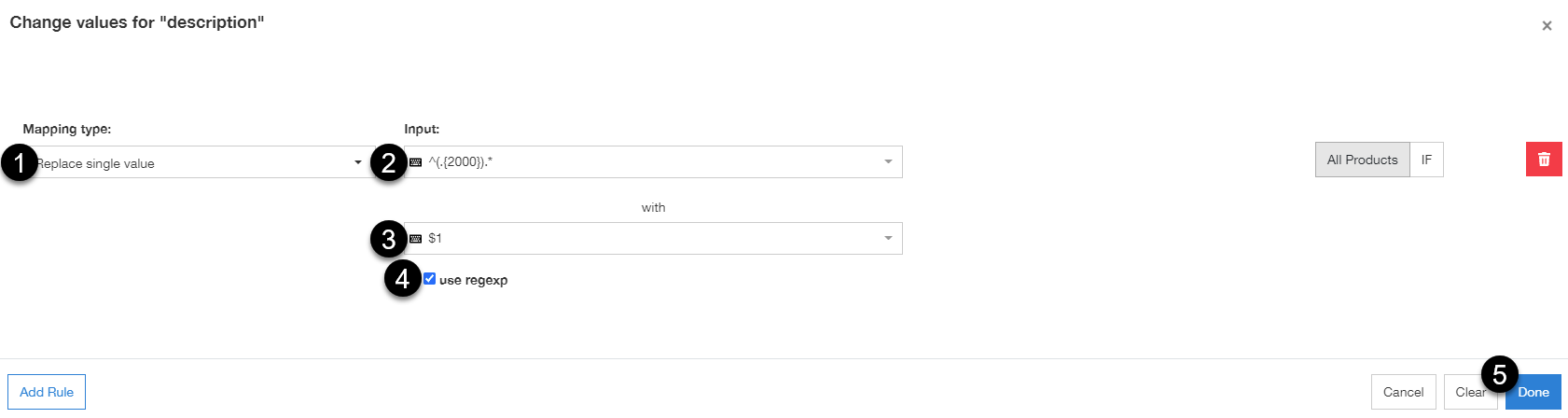
To shorten any field content (e.g. description) to any number of signs (e.g. 2000 signs), follow the steps below:
You can use this to shorten the content of any field, to any number of signs. ✨
- Select for a field with a Main mapping type (e.g. Use)
- Click Edit Values

- From the drop-down list, select Replace single value
- Past the following:
- The first field: ^(.{2000}).*
- The second field: $1
- Select the use regexp box
- Click Done
- To save it and continue to channel processing, click Save and Proceed