
NOVEMBER 2026
November 3rd
New features and changes
- Missing vs. zero performance data – changed how rules treat products without Google Ads performance data: they're no longer counted as 0, so you can target products with no data and products with a value of 0 separately. Numeric conditions, including “= 0”, now match only products that have data.
- Faster Live Preview with remote files – improved Live Preview response times several times over, especially for mappings that use Google Sheets or other remote files. The refresh button also reloads those files much faster.
- New Download statistics page – moved Download statistics to the new app interface with refreshed charts.
Bug fixes
- Saving include and exclude rules – fixed an error message that appeared after saving an include or exclude rule, even though the change had been saved.
- AI results after changing filters – fixed AI-optimized titles and descriptions falling back to original values when channel filters were changed while AI processing was running.
- Recapitalize in Edit Values – added validation to the Recapitalize option, so an invalid value can no longer break Preview or block saving your mapping.
OCTOBER 2026
October 28th
New features and changes
- Faster Google Ads account list – improved the Google Ads account list in Performance Labels: it now loads several times faster and only shows accounts that can actually be connected.
- Clear message when Google Ads access isn't granted – added a message with a reconnect option when you sign in with Google but don't allow access to Google Ads.
Bug fixes
- Performance data at busy times – fixed an issue where some products received no performance data when many feeds were processed at the same time.
October 20th
New features and changes
- Performance Labels now available to all users – introduced Performance Labels: connect your Google Ads account and use product performance data in your mapping rules, for example to exclude products that don't perform or improve titles and images of underperforming products.
- Value distribution for any field in Live Preview – added a “Show distribution” option that breaks your products down by the values of a selected field, such as Availability, Brand, Gender, Age Group or Sale Price. It works in every channel and in Master Fields, helping you spot data issues before you publish your feed.
- WooCommerce Connector update – released a new version of the DataFeedWatch WooCommerce Connector plugin with security improvements. If you use the plugin, please update it to the latest version.
- Faster Live Preview – improved how Live Preview refreshes while you edit your mapping, so it responds faster on large mappings and always shows results for your latest changes.
Bug fixes
- Availability check in Feed Review – fixed an issue where Feed Review didn't flag invalid availability values (e.g. “in stock” instead of “in_stock”) in Google feeds.
- Edit Values with AI-mapped fields – fixed an issue where Edit Values rules were skipped for AI-mapped titles and descriptions when AI content couldn't be generated and the original values were used instead.
- Clearer file errors in Live Preview – fixed a generic error shown when a file used in your rules can't be read, for example an invalid CSV or a link that redirects to a broken address. Live Preview now shows a clear message instead.
- One-click feed setup – fixed an empty page that appeared when adding a channel with unmapped Master Fields, and improved how AI timeouts are handled during setup.
- Google category in Channel Products – fixed an issue where the google_category and google_category_name columns were sometimes missing from Channel Products when categories were mapped for only some products.
- Mapping rollback – fixed a save error when rolling back mapping changes in channels that use an “Extract from” rule with a file uploaded from your computer.
October 6th
Bug fixes
- Live Preview when switching fields – fixed Live Preview not refreshing when you switched between a Master Field and an input field with the same name.
- “Is in list” conditions with spaces – fixed Preview and Live Preview results for “is in list” conditions whose values contain spaces.
SEPTEMBER 2026
September 22nd
New features and changes
- Fields used in mapping in Live Preview – added a list of the Master Fields and input fields your mapping uses, with their values for each product, so you can see where the result comes from. For AI mappings, it shows the data sent to AI.
- Filter Live Preview by segment – added segment filtering to segmentation previews: click a segment to see only the products assigned to it.
Bug fixes
- Field names after reordering rules – fixed field name pills disappearing after you changed the order of rules.
September 8th
New features and changes
- Product image and title in Live Preview – added each product's main image and title next to its ID in Live Preview, so you can recognize products at a glance while validating your mapping.
- Magento plugin supports PHP 8.5 – updated the DataFeedWatch Magento plugin to work with PHP 8.5.
Bug fixes
- A/B testing after a shop transfer – fixed an issue where Titles A/B testing couldn't be turned off after a shop was transferred from an account on a higher plan.
- Structured title and description fields – fixed optional fields for structured titles and descriptions not appearing in the Add optional fields window.
- “Talk to Sales” on the Shopify plans page – fixed the “Talk to Sales” button on the plans page for Shopify users.
AUGUST 2026
August 25th
Bug fixes
- Fluctuating product counts from shopping cart plugins – fixed downloads that could skip pages of products when a store limited incoming requests, which caused changing product counts and missing categories.
- Shopify translations – fixed translated variant option values, such as colors, sometimes landing in the wrong fields in secondary-language Shopify feeds.
- Empty values in Preview – fixed Preview and Live Preview showing empty values for some text fields even though the output feed was correct.
- “AI-Filled” label – fixed the AI-Filled label appearing on fields that only have “ai_” in their name.
August 11th
New features and changes
- Custom Label segment distribution in Live Preview – added a summary to Live Preview for Google Shopping Custom Labels that shows how many products, and what share, fall into each segment, so you can check your segmentation before publishing.
Bug fixes
- Live Preview updates – fixed Live Preview not refreshing after you removed a condition or switched between AND/OR, along with several smaller display issues.
- Shopify collections – fixed an issue where some Shopify collections weren't downloaded.
JULY 2026
July 28th
New features and changes
- Relative date conditions – added date conditions such as “is in the last” and “is in the next” X days, which work with any date field in your feed, plus a new “Today” system field. Date fields are now labeled in field lists, and their conditions are grouped for easier selection.
Bug fixes
- WooCommerce variants – fixed an issue where product variants weren't downloaded from some WooCommerce stores.
- Images in the Products list – fixed image loading issues in the Products list.
July 14th
Bug fixes
- Endless loading screen – fixed an issue where the app could get stuck on a loading screen after a failed background request.
- Adding BigCommerce stores – fixed validation that blocked adding some BigCommerce stores in Shop Wizard.
JUNE 2026
June 30th
New features and changes
- Truncate in Edit Values – added a Truncate option that shortens values to a set number of characters, with an option to keep whole words. No regular expressions needed.
- Add another instance of a repeatable field – added an “Add another” action for fields that can appear more than once, such as additional image link, so you can add numbered instances without reopening the field window.
- Consistent “Add Master Field” button – updated Master Fields to use the same wide Add button as channel mapping. It opens on Recommended fields by default, which helps you avoid duplicates such as Color and Colour.
Bug fixes
- Edit Values on complex mappings – fixed Edit Values freezing on complex mappings.
- Live Preview with Edit Values – fixed Live Preview not opening when you started by editing values, and an issue with cancelling changes.
- Long values in product details – fixed long HTML values and links being cut off in product details.
- Feed-Based Text Ads plan changes – fixed a missing error message on the Plans page when a Feed-Based Text Ads downgrade wasn't allowed.
June 16th
New features and changes
- Repeated fields shown separately in Channel Products – changed how Channel Products and product details show fields that repeat in the feed, such as additional_image_link: each instance now appears separately, as in your output feed.
June 2nd
New features and changes
- Faster adding of fields in Mapping – introduced a new window for adding optional and custom fields, where you can select several fields and add them in one go. The Add buttons now sit at the bottom of each section, so you don't need to scroll back up.
- Translated Shopify metaobjects – added translations for metafields that reference Shopify metaobjects. They apply when both Download Metaobjects and Download Metafield Translations are enabled, so your multilingual feeds use translated values.
Bug fixes
- Edit Values freezing – fixed freezing in Edit Values.
- Mapping rollback – fixed several issues with rolling back mapping changes.
- Adding a channel when AI is unavailable – fixed an error when adding a new channel with one-click setup while the AI service was temporarily unavailable.
- Number conditions on long text – fixed processing failures when a rule compared a very long text field, such as a description, with a number.
MAY 2026
May 26th
Bug fixes
- Shopify access error – fixed an issue where some Shopify shops failed to download with an “ACCESS_DENIED” error.
May 19th
New features and changes
- Export feed from the channel list – added an Export feed option to each channel's menu on the channel list, so you can reach export options without opening the channel.
Bug fixes
- Adding a new channel – fixed a server error that sometimes prevented adding a new channel.
May 5th
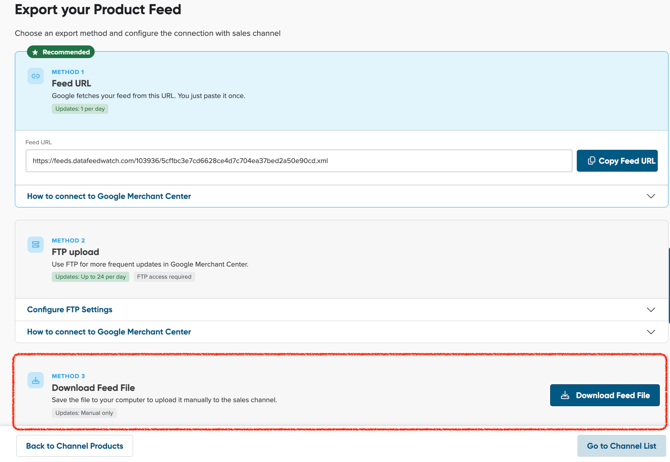
- Download feed file from Export page – added a new export option allowing users to directly download the generated output feed file to their local storage.
- Group fields conversion to standard fields – introduced the ability to convert mapped structured group fields into single fields (e.g. JSON-based shipping data), simplifying mapping and allowing easier handling of complex data structures.
APRIL 2026
April 13th
-
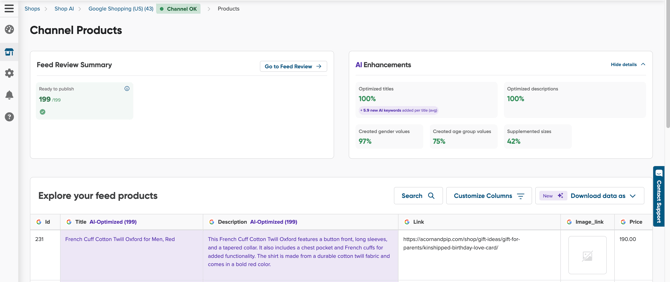
Channel Products: Feed Review Summary & AI Enhancements – added new widgets to the Channel Products page providing a quick overview of feed health and visibility into how much of the feed was generated using AI (if enabled), along with its potential impact.
April 27th
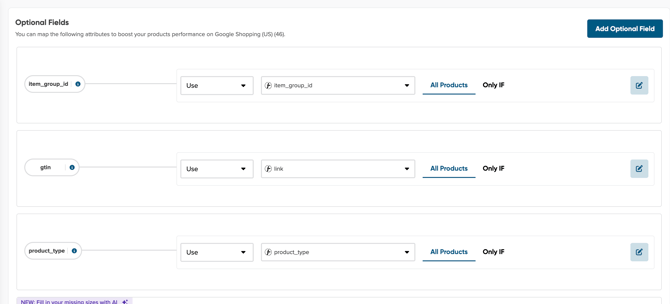
- Mapping UI cleanup with improved group fields design – refreshed the mapping interface with a cleaner layout and removed unused elements to improve clarity and usability, especially for complex mappings.
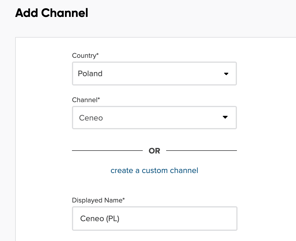
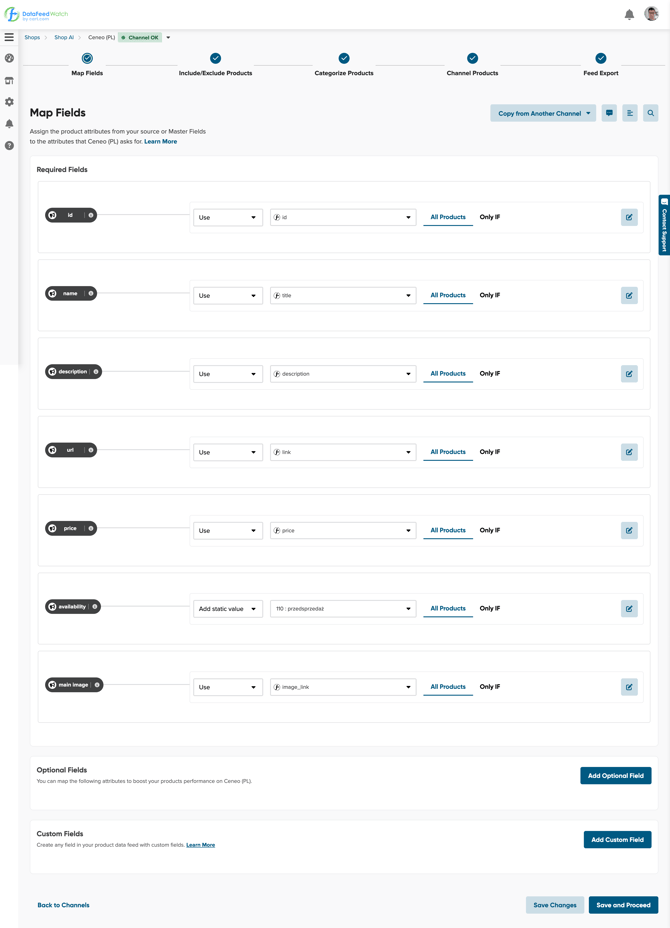
- New Ceneo Channel implementation – fully rebuilt the Ceneo channel integration to fix issues from the previous version and better support Polish merchants, including support for custom fields and broader product category coverage.
MARCH 2026
March 10th
-
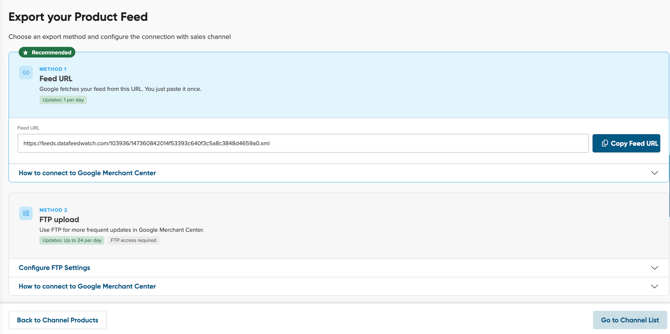
New Feed Export view – introduced a dedicated export page where users can choose between multiple export methods depending on their needs: Copy Feed URL, export via FTP, or download the output feed file directly.
March 24th
-
Live Preview visibility control – Live Preview no longer appears automatically during mapping. Users can now open and close it manually, allowing for a cleaner workspace and more control over the layout.
FEBRUARY 2026
February 9th
-
Improved Channel Products UI – “Copy Feed” visibility – simplified the Channel Products interface to make the main export action (“Copy Feed”) easier to find and access at the end of the workflow.
JANUARY 2026
January 26th
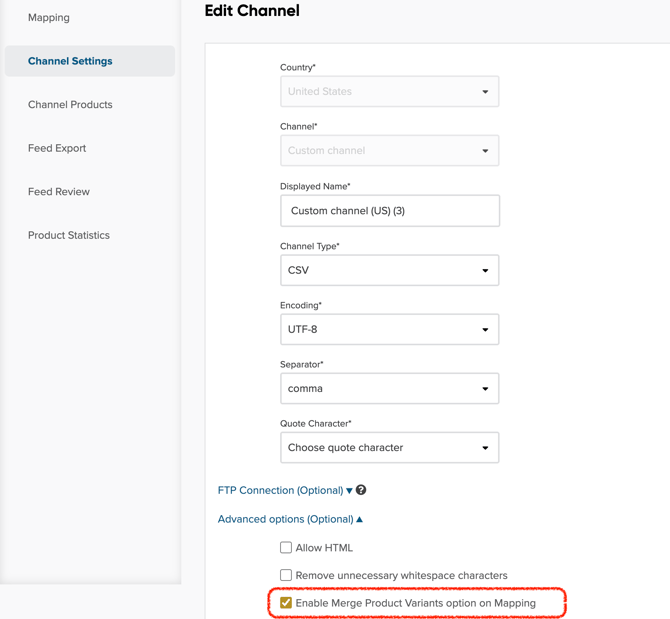
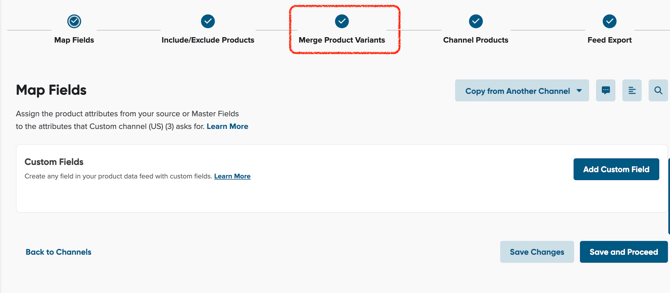
- Variant merging for Custom and other channels – added the ability to merge product variants in custom-built channels, giving more flexibility in feed structure and product grouping.
- Create Master Field without switching to Edit Mode – previously, adding a new Master Field required switching the entire view into Edit Mode. Now you can add new fields directly, making the setup process faster and more intuitive.
DECEMBER 2025
December 16th

We listened to your feedback and made a simple name change to enhance clarity and understanding in your data feed optimization process. Internal Fields are now Master Fields!
Nothing changes about how your feeds work, just the name! We're committed to making your data management experience clear and fast.
December 1st

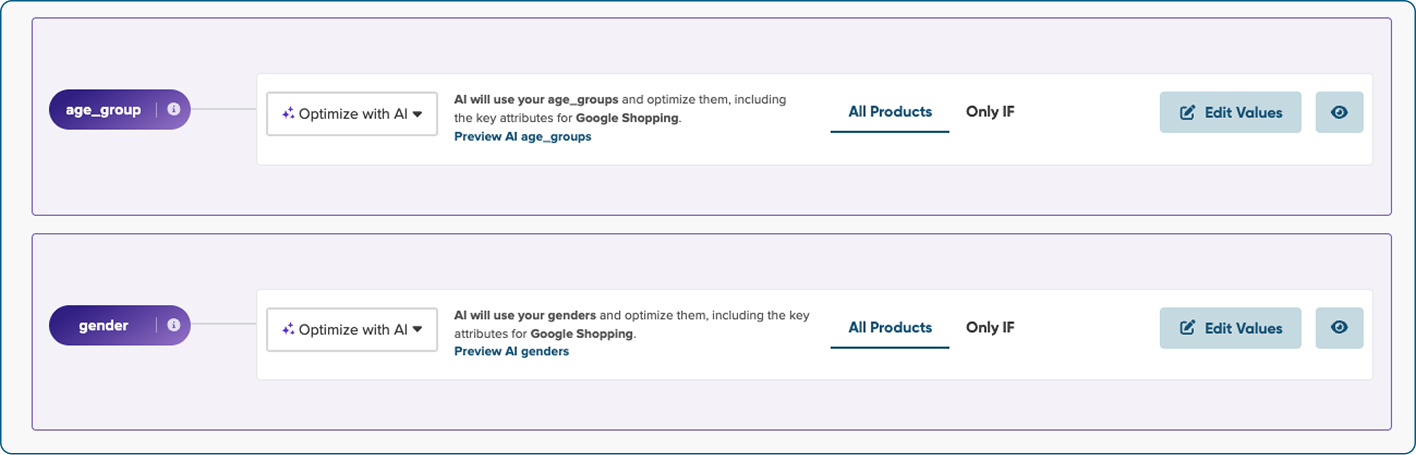
Our AI-powered data mapping feature has been expanded to now support Pinterest, Snapchat, TikTok, and Bing for all languages This allows you to launch campaigns faster on key social and search channels globally, ensuring your products meet the requirements for these high-traffic platforms.

You can now use our AI to automatically create the necessary values for the product attributes Age Group and Gender directly within the mapping process.

For the users integrating with Shopify, we have added a new option that allows you to download detailed inventory stock data. This new data includes information about product availability across different store locations.

NOVEMBER 2025
November 18th

If your Shopify store was set up before October 21, 2025, you may still be using the Legacy Currency-Based Pricing model, which can cause price discrepancies and limit localized feeds.
We’ve introduced Country-Specific Pricing (Shopify Markets) to replace the legacy model. This update ensures accurate pricing for each country, providing you with more flexibility to tailor feeds by currency, language, and local pricing.
Refer to our Help Center article to learn more about this update and how to switch from the legacy currency-based model to market-specific pricing.

OCTOBER 2025
October 21st

You can now set up your Shopify shop in DataFeedWatch to reflect different product prices and availability for each country you sell in - using Shopify’s multi-country markets integration.
We’ve added this feature to help you create accurate, localized product feeds for international markets. This means your customers in each country will see the right products at the right price.
It’s a big time-saver for global merchants and agencies managing multiple markets.
👉 Learn more about configuring Shopify with multi-country markets.
SEPTEMBER 2025
September 09th

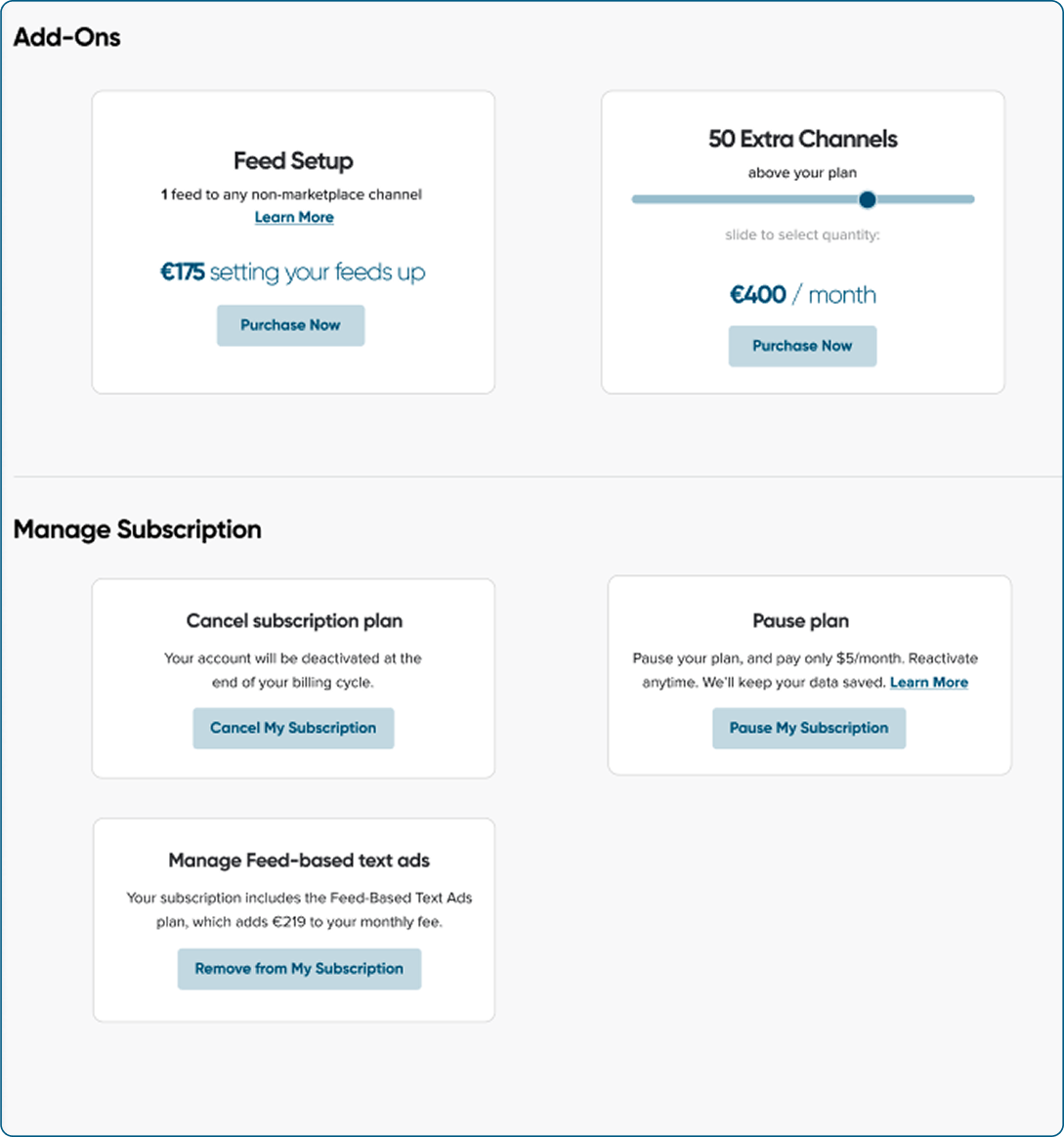
We’ve redesigned our pricing page to make managing your subscription easier than ever.
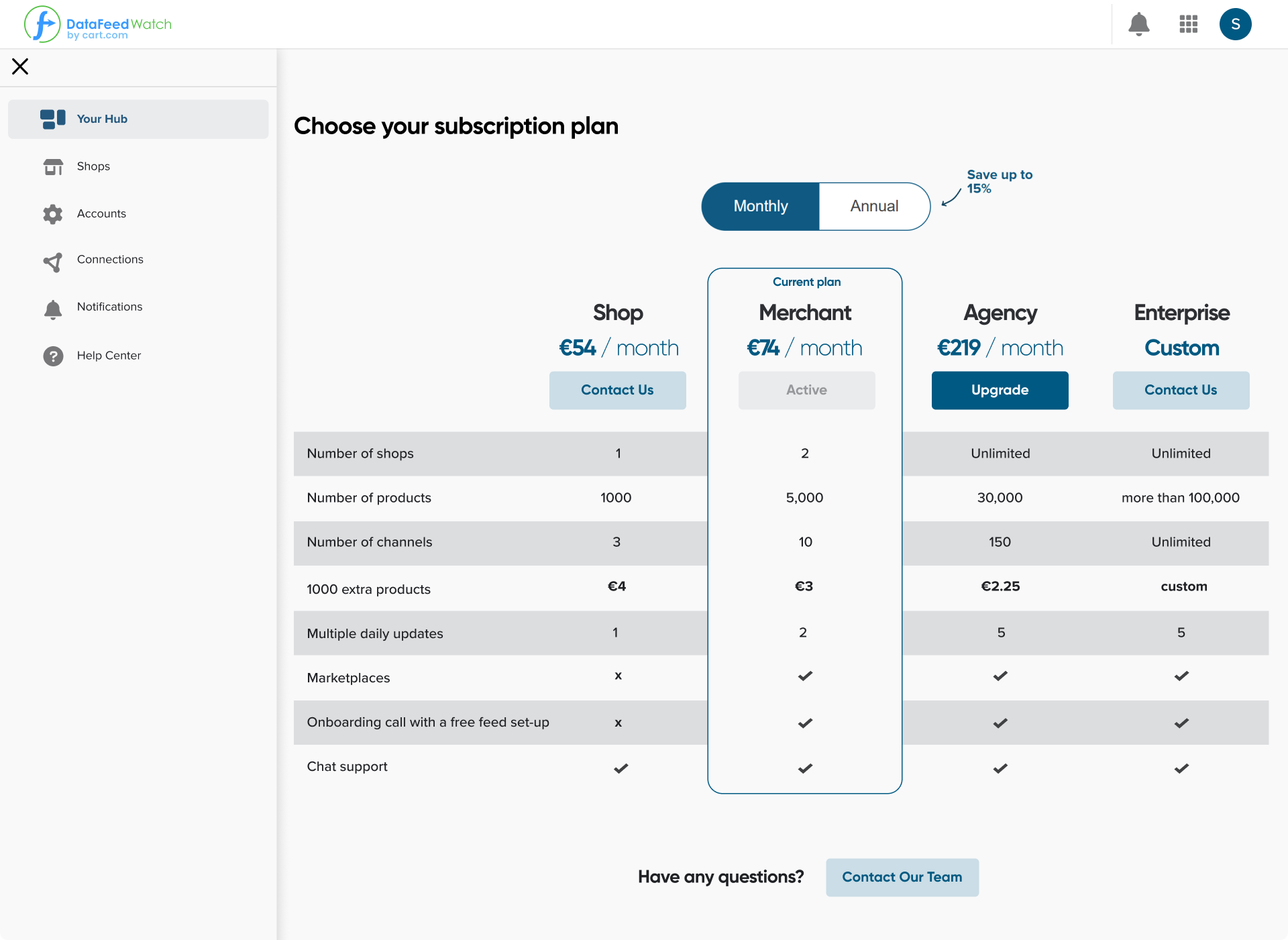
We have enhanced the interface to help you navigate your plan, add channels, or request feed setup with ease. The new layout is more intuitive, giving you more control with fewer clicks.

Until now, our AI could only optimize feeds in English. That’s changed.
We have expanded language support to let you improve your titles, descriptions, and missing attributes (size and color) in Polish and German.
This means smarter and easier feed optimization for more markets!
AUGUST 2025
August 28th

We’ve removed the large banner promoting the Free Onboarding Call from the main interface. Based on your feedback, it was taking up too much space and cluttering the experience.
We’ve moved the call booking option to the side navigation, making it accessible from anywhere in the app without getting in your way.
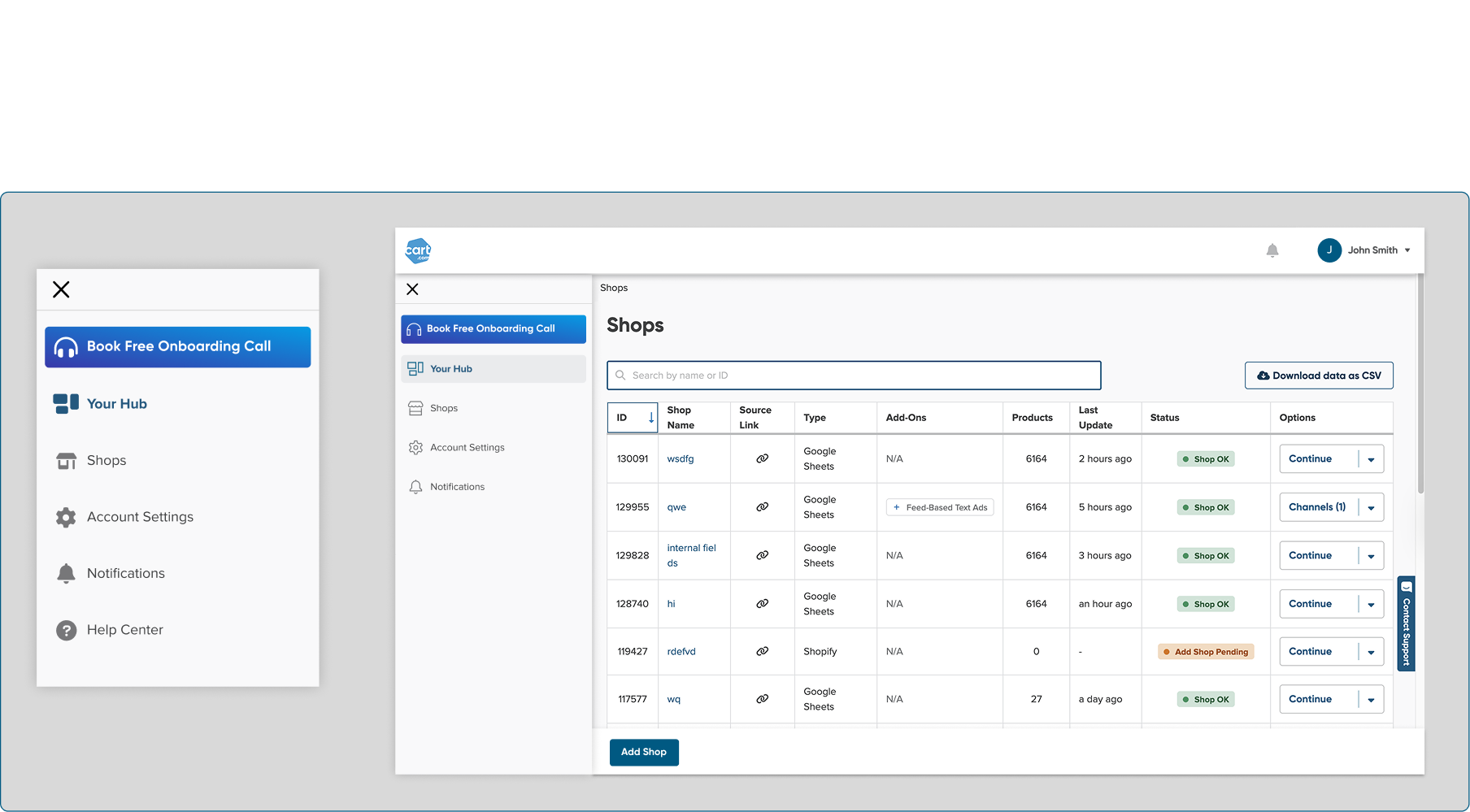
This new placement keeps things tidy and still helps new users get started quickly.
JULY 2025
July 29th

If you’ve got a large shop with loads of products, you might’ve run into freezing issues while customizing your columns.
We resolved the freezing issue to ensure smoother column customization for high-volume shops. This update makes it easier to organize and personalize your data feed without frustrating delays.
July 15th

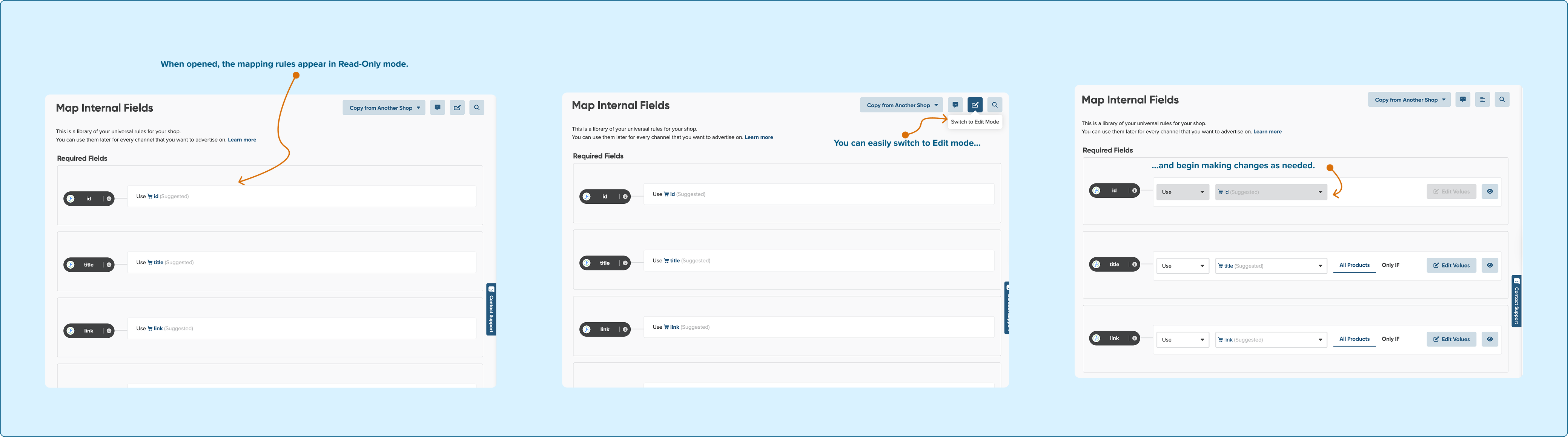
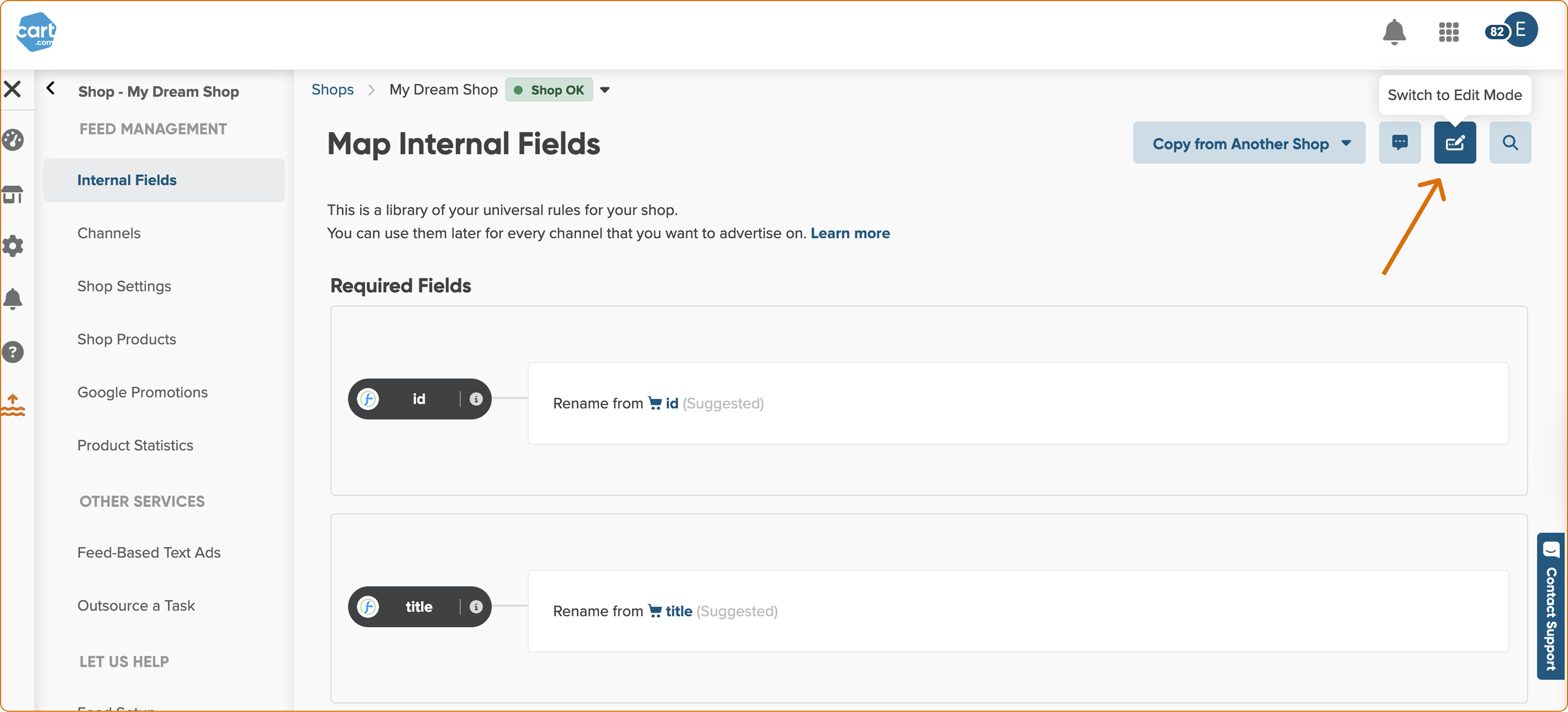
By default, the Map Internal Fields page now opens in Read-Only mode.
We’ve made this change to prevent accidental changes by newer users, which could cause channel mapping issues. If you need to edit, it just takes one click to switch into Edit Mode.

If you're importing product data from Shopify, you might input color information across multiple attributes, depending on how your feed is structured.
To streamline mapping, our auto-detection on the Internal Fields page now locates all the fields containing color details and applies the Combine option to unify them. This reduces setup time and helps ensure product attributes are mapped accurately, without manual cleanup.

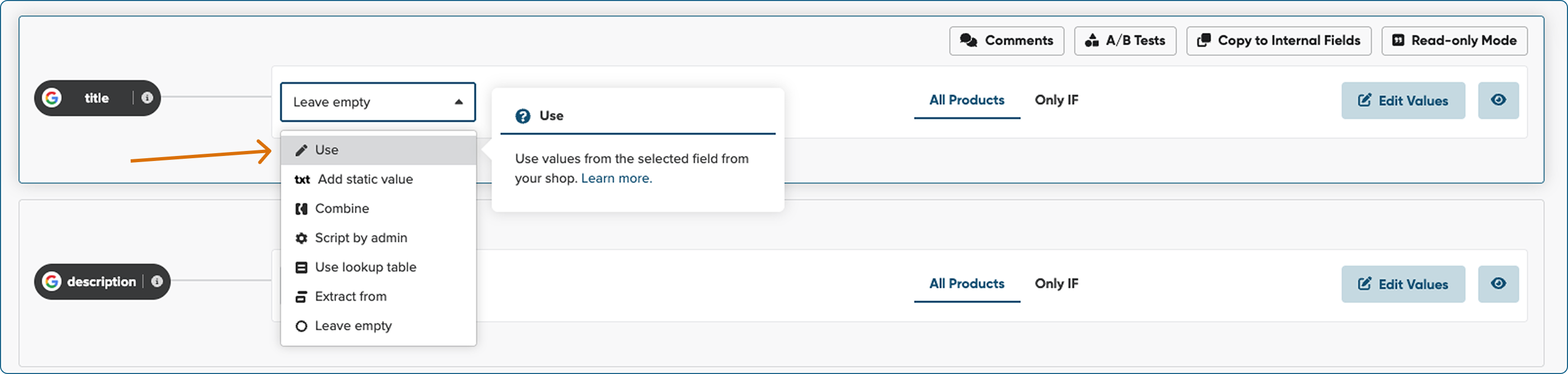
We’ve replaced the “Rename” mapping type with “Use” to make it easier for new users to understand what this feature actually does.
We made this change to clarify that you’re selecting which field from your source feed should be used for a specific attribute in the channel feed, not renaming it. Same functionality, just a better name.
To find out more, please refer to Main Mapping Types: Use.

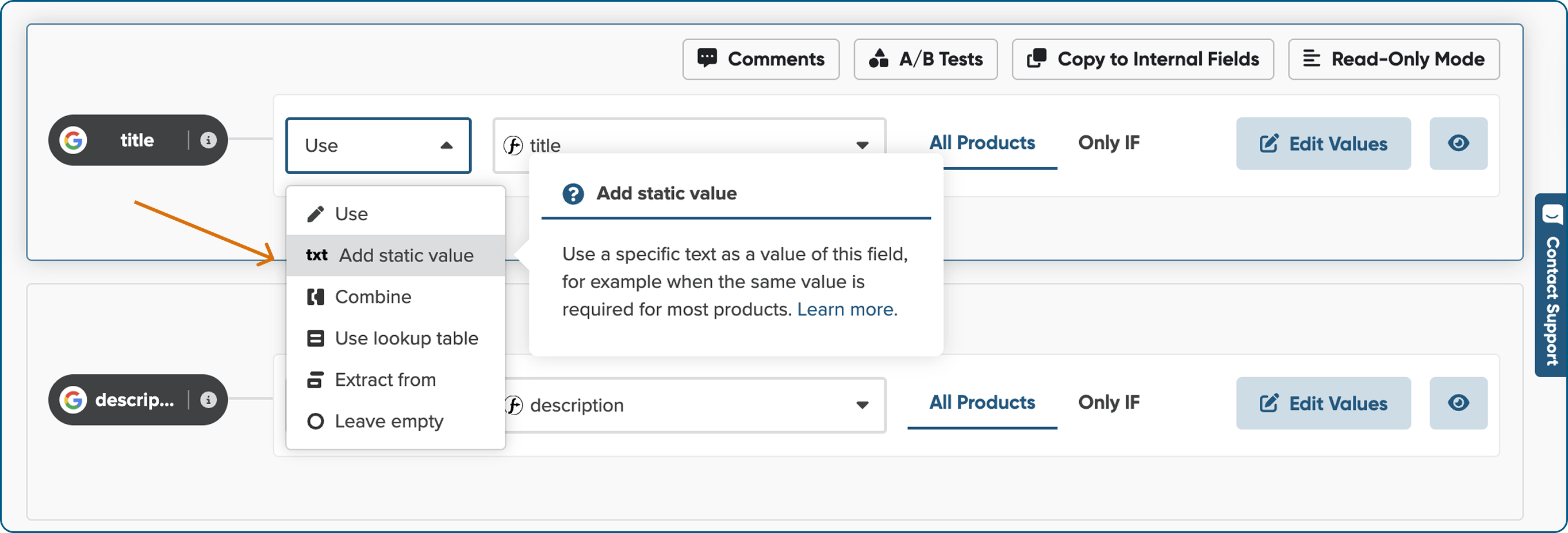
We’ve updated the icons for Add Static Value and introduced a new text icon. We redesigned these visuals to represent their purpose better and lighten up your mapping workspace.

You spoke, we listened. We’ve brought back the larger Edit Values button, so you can easily find and use it when refining your mapping settings.


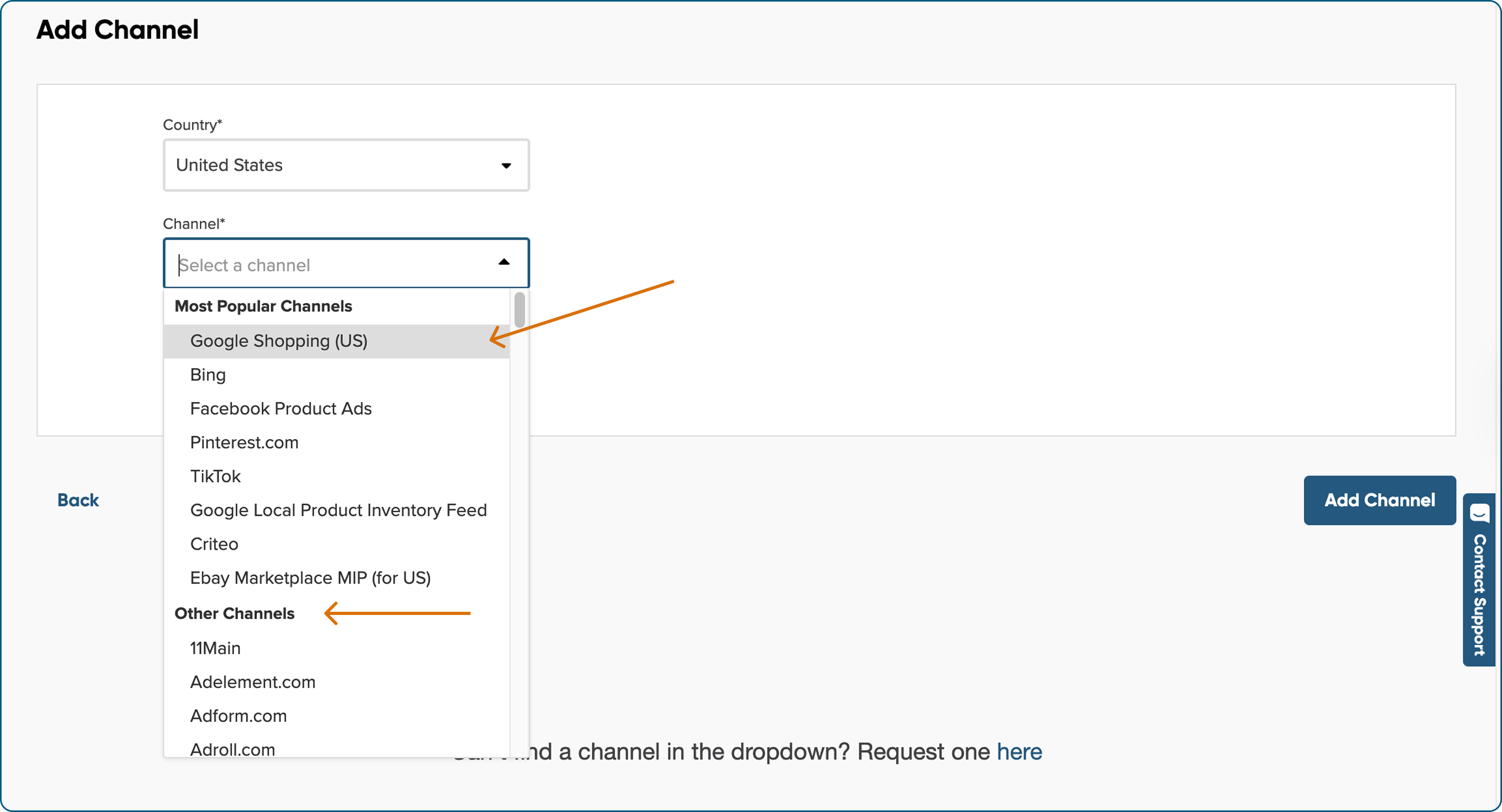
We've reorganized the list of available marketing channels to highlight the most popular ones first. You'll notice the change when adding a new channel. This update makes browsing faster and helps you choose the right channel with confidence.
July 1st

We redesigned the way channel attributes are displayed to help you instantly recognize which fields come from your source (like your shop) and which are specific to the marketing channel.
We’ve introduced distinct pill-shaped fields for channel attributes and added the channel logo next to each, so you always know exactly what you’re mapping.


We’ve tidied things up for a smoother workflow. We replaced the cluster of primary buttons in the top-right corner with sleek, compact shortcuts to your most-used actions.
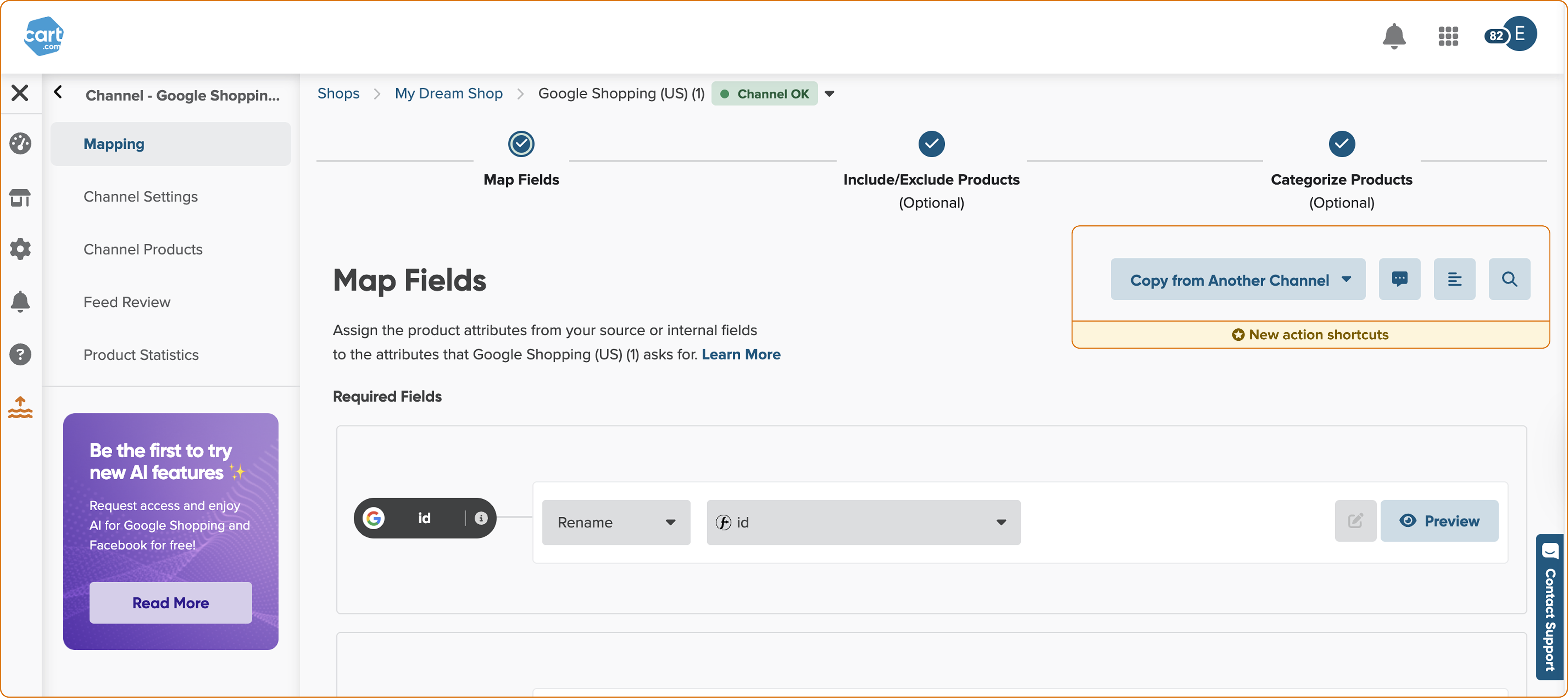

Reviewing internal fields is now simpler and clearer. We heard from beginner users that the setup wasn’t easy to grasp at first, so we renamed “Text Mode” to “Read-Only Mode” and made it the default when opening the Internal Fields page. This way, you can easily skim through the rule setup without distractions.
When you're ready to make changes, just switch to Edit Mode. We’ve also cleaned up the layout to improve overall readability for everyone.
JUNE 2025
June 17th

We’ve added a new step to the flow to make creating your feed from Shopify to Google Shopping even easier.
Now, you can let our automation handle the mapping — just click, wait a moment, review, and you’re good to go.
Less manual work, more time for strategy.

Waiting for Feed Review and channel products is now shorter than ever. We optimized our backend processing to speed up the creation of your feeds.

We’re listening and improving. We gathered feedback from our users to redesign the mapping interface, making it clearer, better organized, and easier to navigate.
This is just the start of how we’re making your workflow smoother.
June 4th

We’ve introduced the Strip HTML option in Edit Values to help you clean up product descriptions effortlessly.
Now, with just a few clicks, you can remove unnecessary HTML tags, ensuring your product description stays cleaner and better structured for search engines and marketing channels.
If you still want to keep basic formatting, you can check the "Keep basic formatting" box to preserve essential HTML elements like lists, bold text, and paragraph.
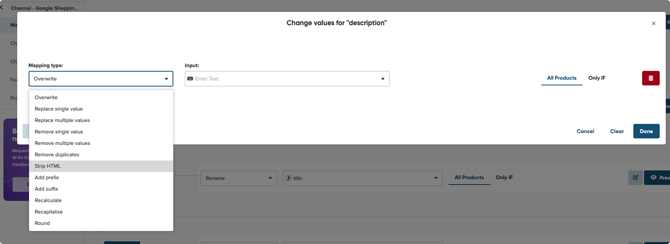
If you want to learn, how to apply this option, please refer to: How do you remove HTML tags from your description?
MAY 2025
May 20th

We’ve updated the field requirements for Google Shopping and Bing mappings.
- The GTIN field is no longer required, as it’s optional for these channels and was causing unnecessary confusion. You’ll now find it in the Optional Fields section.
- We made the BRAND field required to ensure your listings include this essential attribute, improving feed quality and compatibility with Google Shopping and Bing.
This update helps streamline setup and reduce errors when configuring your product feeds.

We’ve enhanced the Feed Review feature to give you a clearer snapshot of your feed’s readiness. It still highlights potential errors and warnings, but now it goes a step further.
We added product breakdowns to show you:
- How many products are ready to be published
- How many require fixes before submission
- How many could be improved to maximize the visibility
This gives you more control and clarity, helping you prioritize what matters most before pushing your feed live.

We removed the unnecessary check for the read_locations scope when including the inventoryItem section in the GetVariantsQuery. This section no longer depends on the location access, aligning better with how inventory data is structured.
- Shops without read_locations still get inventory data, just in a simplified format, without inventoryLevels.
- Shops with read_locations continue to access the full inventory structure, including detailed levels and locations.
April 2025
April 22th

We’ve started improving our platform to meet the requirements of the European Accessibility Act (EAA).
This means a more inclusive, user-friendly experience for all users, supporting your compliance goals and strengthening your brand’s accessibility commitment.
April 08th

We support English data feeds, and to avoid confusion, we’ve hidden the AI option for unsupported languages.
AI-generated suggestions for titles, descriptions, color, and size are now hidden when your input feed uses a language that our AI doesn't support. This ensures a cleaner workspace and a more relevant experience.

We fixed a bug that was causing issues with how configurable products were handled in Magento Enterprise (Adobe Commerce).
This update ensures product data is selected and synced correctly. We also made the plugin compatible with PHP 8.3, so it works smoothly in newer environments.
Everything should now run more reliably, with no action needed from your side.
March 2025
March 25th

We've added a new input field, country_code_of_origin, to our mapping for Shopify users. While Shopify has always allowed you to set this field, you can now map it in our app. This field lets you define the ISO 3166-1 alpha-2 country code of an item's origin, making it easier to use this data for marketing and other purposes.

In the last sprint, we worked on backend improvements that might not be immediately noticeable to you, yet crucial for the smooth functioning of our app.
We also focused on upcoming improvements planned for the next quarter.
March 10th

Hi! We know it’s been a while, but we have great news: we're bringing back our release notes! From now on you can stay up to date and make the most of the latest changes in our app.

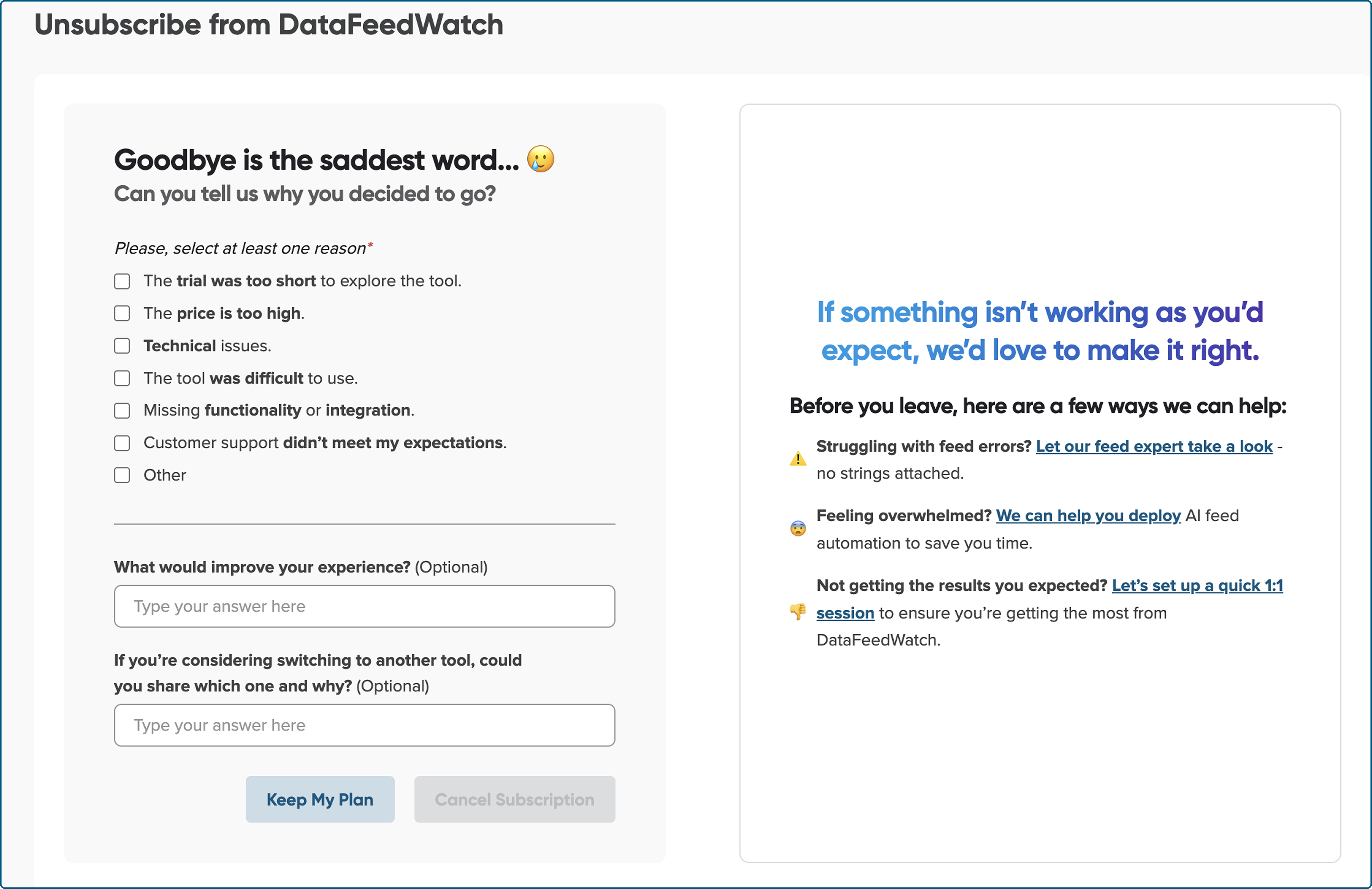
To continuously improve and tailor our features to your needs, we’ve introduced a new, more intuitive cancellation form. This helps us gather valuable insights that will shape a better experience for all users.

We’re in the process of updating changes for affected users. If you haven’t upgraded yet and this change impacts you, please follow the steps in our guide: Shopify API upgrade 2025. Inventory scope changes.

We're working on an improved product feed preview, allowing you to check your output feed products more easily. Stay tuned, this enhancement will be available soon!